
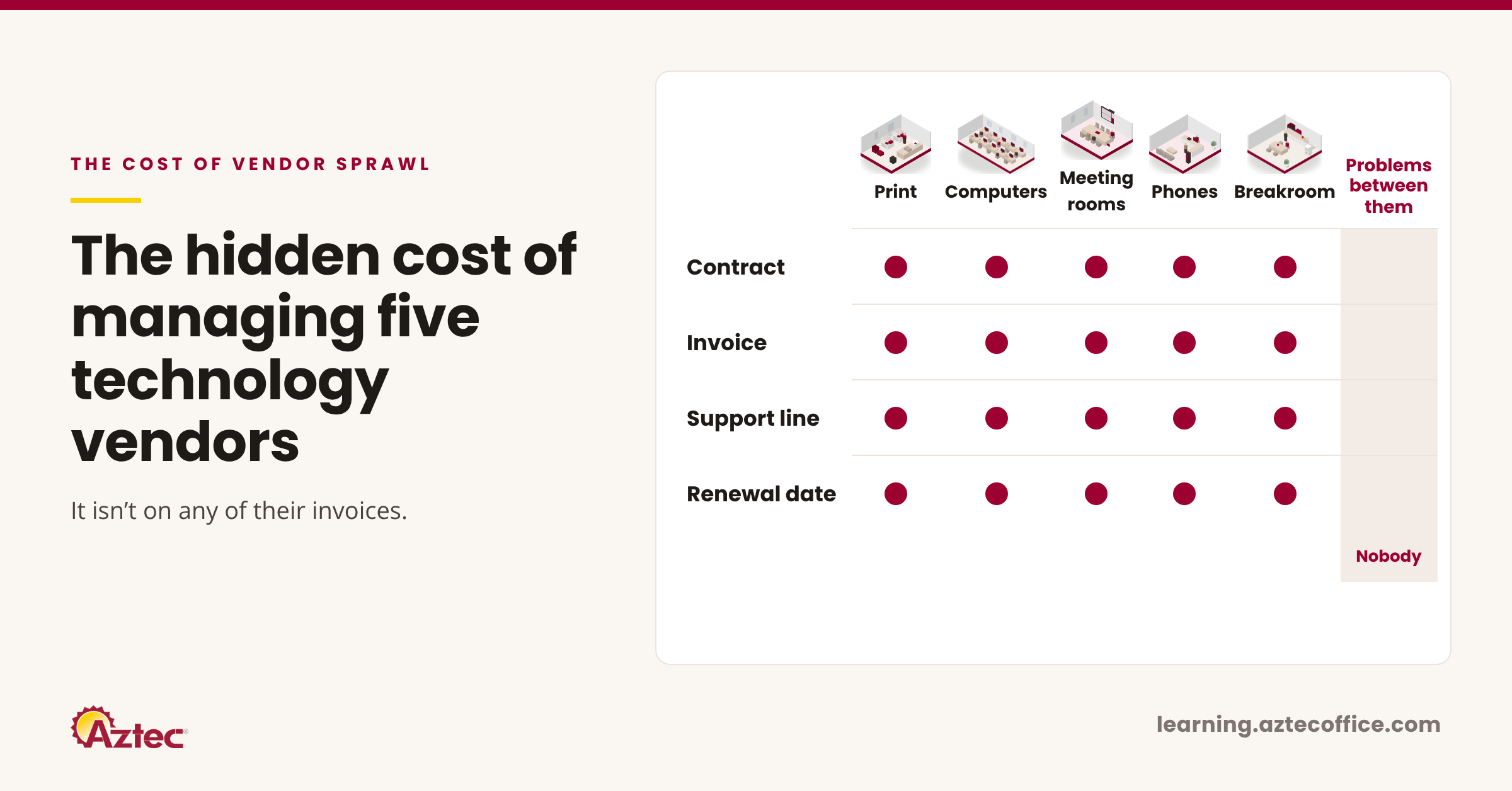
The hidden cost of having separate vendors for print, computers, meeting rooms, phones, and breakroom service isn’t on any of their invoices. It’s the staff time spent managing them, the downtime when a problem falls between two of them, and the renewals nobody had time to review. Most offices never add it up because it’s spread across several people’s weeks. You can estimate it in about 15 minutes with the worksheet below.
This post is for the operations, finance, or office leader who suspects the vendor list has gotten out of hand but hasn’t had a reason to measure it. It covers where the cost sits, how to put a number on it, and what to do once you have it.
In this post
- How offices end up with five vendors
- Where the cost actually sits
- Put a number on it: a 15-minute worksheet
- What to do with the number
- Frequently asked questions
- The short version
How offices end up with five vendors
Nobody plans it. The copier dealer came with a lease years ago. The phone vendor came with an office move. The coffee service was someone’s idea three office managers ago. The laptops come from wherever IT found a good price that quarter.
Each decision made sense at the time. Together, they leave you with five sets of contracts, invoices, support numbers, and renewal dates, and no one whose job is to manage all of them.
Where the cost actually sits
1. Staff time spent coordinating
Every vendor generates work that never appears on its invoice: approving and coding the bill, calling support, scheduling service visits, sitting through account reviews, and chasing quotes at renewal. That work usually lands on an office manager, a controller, or an IT lead with other responsibilities. Multiply it by five vendors and it becomes a real part of someone’s week.
2. Problems between vendors
The meeting room that won’t connect involves the display, the camera, the phone system, and the network, often from three vendors. Each one can reasonably say the problem belongs to someone else. While they sort it out, the meeting doesn’t happen. The cost isn’t the service call; it’s the hours of people waiting on a problem nobody owns.
3. Renewals nobody reviewed
Many office technology agreements renew automatically unless you give notice by a set date. With five vendors, you have five of those dates, scattered across the year. The ones that slip by renew at the old terms, on old equipment, without anyone deciding to keep them. We explain how to catch them in How to Read a Technology Proposal.
4. Equipment nobody planned to replace
When each vendor sees only its own corner, nobody sees the age of everything at once. Replacements happen when something fails rather than when the budget expects it, and old equipment stays in service past the point where it’s secure or reliable.
5. Duplicates and mismatches
Separate vendors rarely know about each other’s equipment. The result is more devices than the work requires, different models at each site, and a different set of supplies for each one.
Put a number on it: a 15-minute worksheet
You can estimate the coordination cost yourself. For each vendor, write down:
| For each vendor | What to count |
|---|---|
| Invoices | How many a month, and how long each takes to approve and code |
| Support | How many calls or tickets a month, and who makes them |
| Visits and reviews | Service visits to schedule and account meetings to attend |
| Renewal | Hours spent reviewing quotes and terms when the contract comes up |
| Problems between vendors | Hours lost last quarter to an issue that involved two vendors |
Add up the monthly hours across all five vendors, multiply by the hourly cost of the people doing the work, and multiply by 12.
An example of the math, not a benchmark: if three people each spend two hours a week managing vendors, that’s about 300 hours a year. At a loaded cost of $50 an hour, it’s $15,000 a year that appears on no invoice. Your inputs will differ; the point is to use your own.
What to do with the number
You don’t have to move everything at once. Start with the area causing the most trouble, usually the one with the most service calls, the oldest equipment, or the nearest renewal. Fix that one, measure the difference, and decide about the next one from there. We compare that approach with keeping a specialist for each category in one provider vs. a specialist for each category.
Frequently asked questions
What is vendor sprawl?
It’s what happens when an organization accumulates separate vendors for related services, each with its own contract, invoice, support line, and renewal date, without anyone managing them as a whole.
How many technology vendors does a typical office have?
It varies widely. Count the ones that bill you for print, computers, meeting rooms, phones, and breakroom service. Many offices find a separate vendor in most of those areas.
Does consolidating vendors save money?
It can, but rarely through a bundle discount. Savings usually come from fewer devices, fewer invoices, fewer renewals to review, and less staff time spent coordinating. Each area should still be priced on its own merits.
What is the first step to consolidating technology vendors?
List every vendor, its renewal date, and its notice deadline. Then pick the area causing the most trouble and start there.
The short version
Five vendors cost more than their five invoices. The difference is staff time, downtime between vendors, and renewals nobody reviewed. Spend 15 minutes on the worksheet, then start with the area causing the most trouble.
Have a question about your workplace technology?
Our team will walk you through the options for your office.